Où acheter
Besoin d'un conseil? Nos revendeurs hautement qualifiés seront heureux de répondre à toutes vos questions.
Trouver un revendeur près de chez vous
VRM Portal: video, faster and more…
Good afternoon,
Since the last update on February 28th, there have been many improvements to the VRM Portal.
Improved performance. The database has been moved to a better hosting provider so the VRM Portal is now much faster, and more stable throughout the day. This change did have an unfortunate side effect, causing the VRM Portal to be down for 8 hours last night. The good thing is that no data was lost. Such down time should obviously never happen, and it is taken very seriously. The 24/7 monitoring and response team that was already in place should have noticed the problem, but they didn’t. Measures and fail-safes are being taken to prevent this in future. My apologies for any inconvenience caused.List view. There are more and more users that manage tens or even hundreds of sites. Two new features have been added to make that easier. The first one is to see a list of all sites, and their alarm status, instead of the tile view. Toggle between the two views with the slider on the right:
This list view will be further improved in the near future, by adding some columns with for example battery state of charge and voltage. The second improvement is filtering with tags. In this example I have arranged my sites in three groups, depot North, South and East. Adding a tag can be done on the settings page:

After that, filter the sites you want to see by selecting one or more tags on the home page:


And this is the advanced version:

Say you have a rental yacht or RV/motorhome and wish to ensure your customer stays within a certain area. You can now do this and receive an email alarm if the agreed boundaries are broken. Or you may simply want to set an area with a destination, to send an email to friends and family to let them know when you have arrived. Handy when traveling alone. A blue geofence shows the area as active and a grey geofence shows it as inactive.

The above shows an active Geofence using an irregular shape. You can also use a simple circle or rectangle.

Grey shading above denotes an inactive Geofence that can be switched on and made active when ready.
To sum up. Geofence will generate an alarm + email when:
Also it will cancel the alarm (and send a short email) when there is data coming in that indicates that unit is inside the geofence, whilst an alarm was active.
VRM Bug fixes and small improvements:That is all for now, wish you a good morning, afternoon, evening or night!
– Matthijs.
Matthijs Vader • 10 June 2025
Introducing Venus OS 3.60
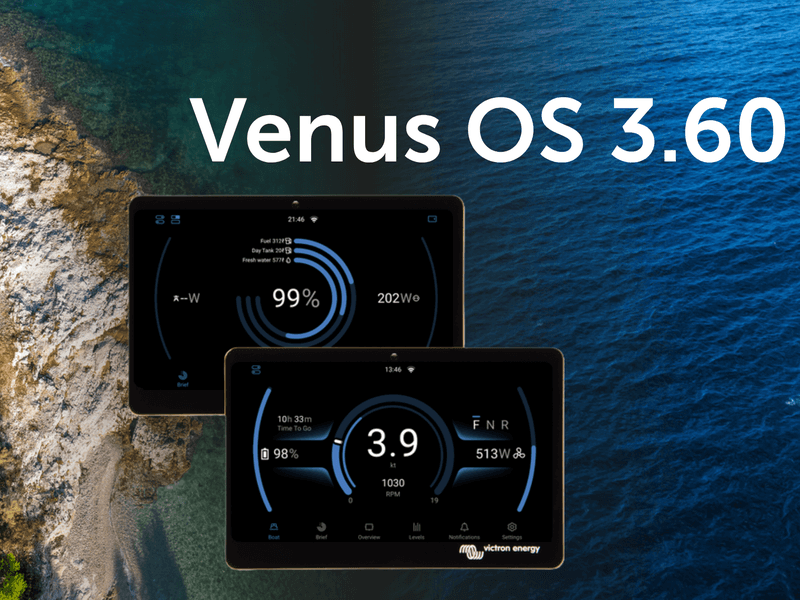
Venus OS for Victron GX devices has been updated today to v3.60 with exciting new user interface features, some much needed fixes and a few great new features under the hood. Before we dive into this blog post, take a moment to look through this slide deck for a visual walkthrough of what’s new. Introducing the new switch pane The new switch pane The new switch pane offers quick access to switching functions in vehicles, boats, or stationary systems, either via touchscreen or through VRM. A button at the top left of the New UI opens the pane, giving users fast access to controls for loads and key systems. Currently, the Energy Solutions DC4 four-channel SmartSwitch is supported. Devices from other digital switching partners will follow soon. Marine-specific updates This release includes a significant update to the Marine MFD HTML5 App, greatly improving display quality on high-definition MFDs such as the Garmin 9000. A night mode has also been introduced, applying a soft red overlay that’s easier on the eyes in low-light conditions. The new night mode in the updated high-resolution layout on a Garmin 9000. This update also introduces a dedicated Electric Boat page, accessible via a new icon at the bottom of the New UI. It’s designed for small craft with electric propulsion systems and displays key information such as speed, RPM, electric motor power consumption, and battery state of charge. The new electric boat page Lastly, the Brief Page in the UI now allows individual tanks to be selected for display as ring gauges, rather than being limited to selection by tank type. This gives users—particularly in the marine and camper sectors—the flexibility to, for example, show total fuel alongside a day tank for quick reference to key values. Updated brief page displaying tank information VE.Bus settings backup and restore This update to the GX device firmware introduces a backup and restore feature for VE.Bus configuration and settings. It allows a multi-unit system to be quickly restored after the failure of a single unit. The restore process automatically identifies the replacement device and applies the correct configuration. This feature also makes it possible to quickly switch between different configurations in applications where regular configuration changes are needed. Restore and backup tabs Added compatibility with Sunwoda and Soluna batteries Support for automatic DVCC configuration has now been added for Sunwoda and Soluna batteries. Integration testing is complete, and both are now officially compatible. You can find more details on the battery compatibility page. Heating & cooling control for NG batteries This release also introduces a new feature that will be especially appreciated by campervan owners spending winters in the mountains or boats sailing in high latitudes. When used with Victron NG batteries, the GX device can now control a relay to manage battery heating in cold conditions and cooling if needed in hot environments. To use this feature, your system needs a CAN-connected battery and a relay configured for temperature control, along with heating pads or cooling equipment installed. Please note that it requires the Lynx Smart BMS NG, and isn’t compatible with the Small BMS NG or VE.Bus BMS NG. The feature also works with other managed batteries, as long as they send cell temperature data to the GX device. PV Inverter limiter support Support for managed PV inverters on GX devices has been expanded to include zero feed-in and dynamic ESS power control on any PV inverter that supports Sunspec™ information models 123 or 704. Equipment from SMA, SolarEdge, Kostal and Enphase has already been confirmed, and we encourage users to test other inverters that state support for Sunspec™ 123 or 704 in their firmware. Redesigned settings menu The GX device was launched well over a decade ago, and since then the range of features and supported devices has grown rapidly. The settings menu was due for an update to improve navigation and make better use of the higher-resolution layout in the New UI. Alongside new high-level categories, the updated menu now includes ‘breadcrumbs’ at the top of the screen, helping users see where they are and easily navigate back to a specific section with a single tap. Settings menu Modification checks page A new ‘Modification Checks’ page has been added under Settings > General, offering a quick overview of the software status on a GX device. More importantly, it gives installers and distributors a clear indication of whether a system has been modified, which can be helpful when diagnosing or providing support. If the startup configuration has been changed, for example to load a custom battery driver, or if an SSH key has been added, this will be shown at a glance. The page also allows users to disable modifications, reinstall the latest firmware, or run an online update, all from one place. Modification checks page Node-RED automation improvements This release brings exciting new updates to Node-RED and support for Victron’s new GX IO-Extender 150. The new version of Victron’s Node-RED support introduces ‘virtual devices’, making it possible to create virtual equivalents of the following devices on the GX: Batteries PV inverters Temperature sensors Tanks Grid meters Meteo/irradiance sensors (irradiance, wind speed, wind direction) GPS Electric motor drive (see boat page) Virtual devices allow data from external systems, such as those using MQTT or Modbus-TCP, to be made available within the GX device and on the VRM Portal. This means the information appears just like data from a fully supported Victron product. For example, it can be used to read or import data from a custom or specialised tank monitor. Another useful update is the ability to control the relay on an MPPT via Node-RED. This version also reduces CPU usage by communicating more efficiently with the GX device. GX IO – Extender 150 The new GX IO-Extender 150 is introduced with this release to give integrators more options to control and integrate devices and systems. It provides the following additional USB-connected I/O to GX devices: 2 x bi-stable relays 1 x solid-state relay 2 x 4 input/output digital IOs 4 x adjustable level outputs (PWM) Fixes and improvements This release brings important fixes to the Cerbo GX MK2 and the GX LTE, which have fixes to the stability of VE.Can port 2 and use with IPv6 respectively. Other improvements include: Systems with a second VE.Bus device connected via an MK3 can now be controlled by the BMS, thanks to a new option in the DVCC menu. The Orion XS can now be configured as a standard DC-DC converter instead of a charger, and in that case will not be controlled by DVCC. ESS no longer throttles PV production when a user selects Optimised together with 100% Minimum SOC. Multi RS now includes better support for generators and can be used in three-phase systems without batteries. The New UI now offers a button in the remote console to add a GX device to VRM without needing the portal ID from the device sticker. Generator control has been improved. It is now possible to stop a generator based on tank level, helping to avoid airlocks when the tank runs empty. DC generators are now detected at input. The ESS feed-in limit has been increased from 32 kW to allow import and export at higher power levels. Dynamic ESS now responds more accurately when actual consumption or solar production differs from the forecast. How to install You can see the information on how to install the firmware in your GX Device manual. Quick links to the relevant pages can be found here: Ekrano GX , Cerbo GX , Color Control GX and for the Venus GX . Before you go We’ve had a huge amount of support from our testing community in preparing this update for release, and I would like to thank everyone, both developers and testers, for helping us get this exciting release out! For more information, you can see the slide show here . Enjoy this new version, Matthijs Vader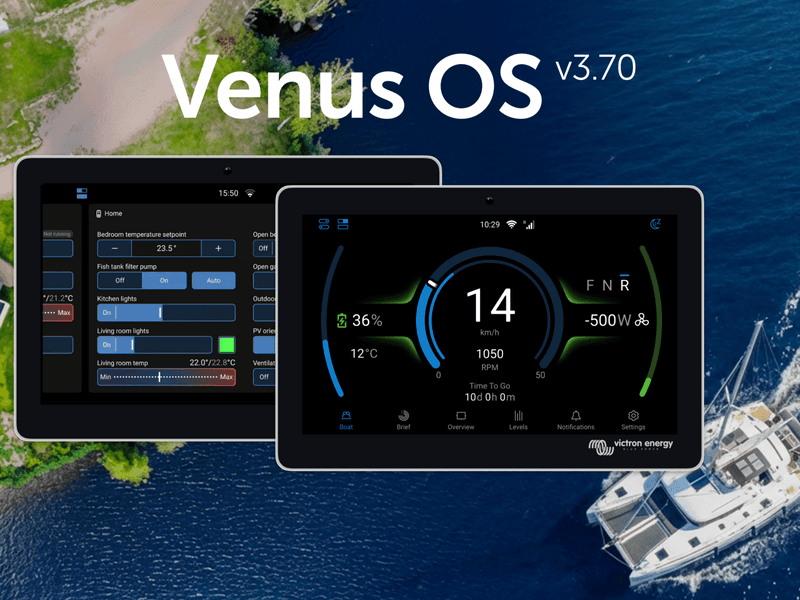
Matthijs Vader • 25 February 2026
Introducing Venus OS 3.70
Victron GX device firmware v3.70 is now available. This release brings a greatly expanded switch pane with Node-RED virtual switches, improvements to GX Boat Page and E-drive integrations, cell level monitoring for Lynx Smart BMS NG, Garmin EmpirBus digital switching, Shelly smart device integration, and much more. The switch pane gets even better The switch pane was introduced in Venus OS v3.60 with support for the Energy Solutions SmartSwitch . In v3.70, it’s grown to become a central point for an entire digital control system. GX relays join the switch pane. The built-in relays on the GX device can now be controlled from the switch pane. Set a relay’s function to Manual under Settings → Integrations → Relays, and it appears as a controllable output. Node-RED virtual switches and supported 3rd party digital switches (such as Garmin, Shelly & Safiery) now also appear in the switch pane, enabling customisable controls. Marine MFD App now includes switch pane support. GX relays, digital switches, and Node-RED virtual switches can be viewed and controlled directly from an MFD display. GX Boat Page: Various enhancements and new CANopen integration Venus OS v3.70 introduces new CANopen profiles, expanding integration options for electric propulsion systems, including Sevcon and Curtis motor controllers. This CANopen integration path is an addition to the already existing NMEA2000 integration. Together, these options enable electric propulsion monitoring on the GX device for an even wider range of setups, displaying motor RPM, power, current, temperature, and direction. Enhancements for the GX Boat Page apply to both CANopen and NMEA2000 integrations and include: Support for dual motor setups Visualisation of regeneration Smoother RPM gauge animations Option to adjust for inverted motor direction To learn all features and details about E-Drive integration and the GX Boat Page, see this slide deck. Lynx Smart BMS NG individual battery and cell monitoring Detailed information about each specific battery connected to a Lynx Smart BMS NG, including individual cell voltages, and cell temperatures for each battery can now been seen on the GX. Node-RED: virtual switches and smarter workflows Building on the virtual devices introduced in v3.60, Node-RED now offers a powerful set of virtual switch types. These create interactive controls in the switch pane that can be linked to any automation logic in Node-RED flows. This bridges Node-RED programming and the normal GX user interface. A significant workflow improvement is the ability to set multiple properties of a virtual device in a single message , reducing both CPU usage and flow complexity. Where previously you might have needed four or five separate inject nodes to configure a virtual device, it can now be done with one. Input nodes have a new feature called “ conditional evaluation ” which is useful for triggering actions when values cross thresholds (e.g., “battery SOC below 20%“). Victron nodes configured to evaluate conditions can now output TRUE/FALSE on a second output, including combining two conditions (eg. SOC% and PV power) with AND/OR logic. A brief snippet of documentation has been added to each Victron node to make it quicker and easier to understand how to use them. Garmin EmpirBus digital switching A welcome addition for RV builders, boatbuilders, and OEMs, Garmin EmpirBus digital switching is now supported in the switch pane on both the GX display, and via remote console on VRM. New features also improve integration with Garmin and other NMEA 2000-equipped marine displays. Alarms from the GX device are now transmitted onto the NMEA 2000 network . Garmin MFDs will visualise these alerts, giving crew immediate awareness of system warnings from the helm. Allow for Internet access. In systems where the GX device is connected to a Garmin system using ethernet, and then want to use WiFi for internet, it is now possible to select which network interface is internet enabled. Shelly integration Venus OS now natively supports Shelly Gen2 (and newer) smart switches, energy meters and RGB light controllers. This brings better integration for the affordable and widely available range of Shelly smart home hardware to the Victron ecosystem. These are useful for controlling and monitoring AC loads such as water heaters, pool pumps, or lighting circuits. Shelly devices on the same network are discovered automatically, though disabled by default. Once enabled in the Settings -> Integrations menu, Shelly devices appear in the switch pane. Supported device types include on/off switches, dimmable outputs with slider control, and energy meters. It’s also possible to set the RGB controller color in the UI using presets. Safiery STAR Digital Switching Integration Venus OS now includes support for the Safiery STAR-Power, STAR-Light, and STAR-Rover digital switching controllers. Connected via VE.Can, they offer control of 12V or 24V switching circuits directly from the GX switch pane. New sensor and device support Several new device integrations round out this release: Gobius tank sensors are now supported via Bluetooth, as well as Ruuvi Air sensors. Pylontech batteries can now have their firmware updated remotely through the VRM Portal. A significant timesaver for installers with large system fleets connected via VRM. Navigate to the Device List on VRM, where updateable Pylontech batteries will be discovered. You’ll need to obtain Pylontech firmware files, and advice for when updates are needed from Pylontech battery dealers as VRM does not host these files. SSS batteries have passed Victron BMS-Can compliance testing and are now supported. Orion XS is now supported for NMEA 2000-out. Tank sensor improvements include tank shape configuration and high/low alarm settings for Mopeka wireless sensors, as well as improved multi-device tank level handling for MFD displays over VE.Can. New UI improvements The New UI received many refinements: A new Watts/Amps display preference called “Mixed” shows AC values in Watts and DC values in Amps. An option to disable all animations can save up to 40% CPU on a Cerbo GX, making the interface noticeably more responsive. Keyboard navigation has been added throughout the interface. Portuguese and Afrikaans have been added as new language options. Notification handling has been improved across the board. Alarm silencing is clearer, and the overall experience is more intuitive. The phase rotation alarm can now be enabled or disabled from the settings. Fixes and improvements This release includes important fixes across several areas: Dynamic ESS: Fixed precision issues arising from the change to 15-minute windows, particularly for systems with decimal SOC values. Also fixed false battery discharge during scheduled charging with grid-to-battery restrictions, and a bug with negative grid set-points. DVCC: Fixed charge current division between Multi-RS and external solar chargers in systems with PV inverters. Fixed CCL not being applied after turning a Multi off and back on. Added limited CCL control for a second VE.Bus system via MK3-USB. Peak shaving: Fixed bugs where peak shaving was insufficient under some conditions, when Self-consumption from battery was set to “Only critical loads”. PV Inverters: Fixed Enphase limiting issues, and SolarEdge limiter setup repeating on reconnections Security: Brute force protection has been added to MQTT and HTTP(S) login. A new read-only mode for Modbus-TCP provides a more secure option. Raspberry Pi: Raspberry Pi 5 is now supported and includes the new UI. Please note: The New UI cannot render portrait orientation yet. Use the Classic UI if you have the Raspberry Pi Touch Display 2, or other portrait display. Before you go You can find the full list of changes in the changelog here . Information on how to install the firmware is available in the GX Device manual. A quick link to the relevant page can be found here . And as always, a huge thank you to our community for their invaluable help in testing and preparing this release. The detailed bug reports and feedback from the beta testing period have made v3.70 possible.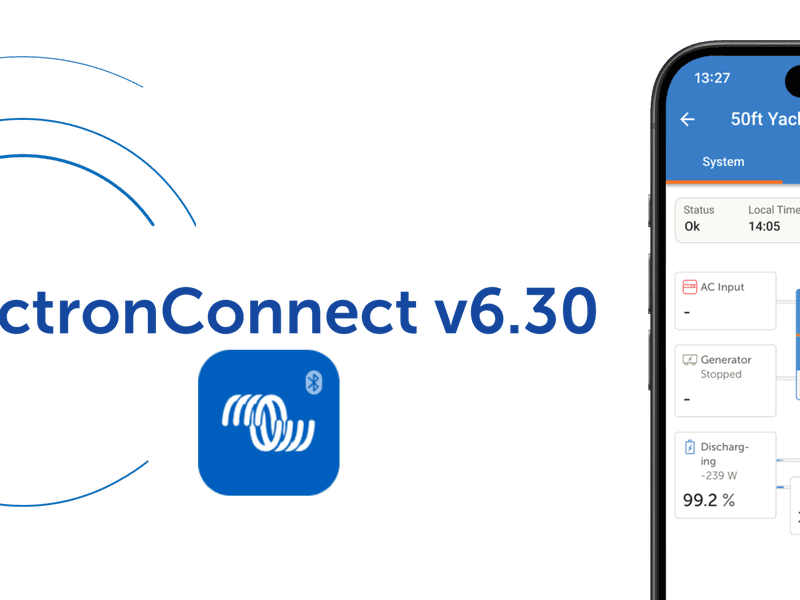
Beril Berkem • 23 February 2026
VictronConnect App v6.30
VictronConnect app v6.30 brings a range of new features designed to make system monitoring and management easier for both professionals and end-users. These include VRM integration, new tools for system monitoring, more insight during firmware updates, and a Batch Programming feature aimed at simplifying work for professionals. In the next sections, we take a closer look at what’s new in VictronConnect v6.30. VRM integration The VictronConnect app has been the go-to app for direct access to Victron products and system monitoring, allowing configuration, firmware updates, and real-time monitoring via Bluetooth with quick access from your phone. The VRM Portal , on the other hand, gives full remote system monitoring from anywhere in the world with internet connection, providing full system overview, detailed performance analysis, remote support, and tools for fleet and multi-system management. VictronConnect v6.30 brings these two worlds closer together. VRM dashboard access is now built directly into the VictronConnect app. Previously, when accessing a system remotely via the VRM tab, the app redirected you to the VRM Portal for full system information. You can now see the system dashboard directly in VictronConnect, including control switching, overview data, and Dynamic ESS information such as costings and schedules, making it easier to understand what is happening across your system from one place. VictronConnect on Android Auto If your vehicle supports Android Auto, you can now view key system information directly on your car’s display while driving through the VictronConnect app on your phone. After updating to VictronConnect v6.30, a VictronConnect icon will automatically appear in Android Auto once a phone is connected. The feature uses Bluetooth Instant Readout and requires no additional configuration or GX device. If Instant Readout data is available for a product in the VictronConnect app (for example, the Smart range), it will also be shown in Android Auto, creating a simple plug-and-play experience. This makes it easy to monitor system status safely while driving, especially in campervans, motorhomes, and professional vehicles. Android widgets and notifications Android users can place widgets on their phone home screen to quickly see important system information without opening the app. It is also now possible to enable notifications so your phone alerts you if something needs attention, giving you peace of mind that your system is running as expected without needing to constantly check it. Notifications and Widgets use Bluetooth Instant Readout and work when your phone is within range of supported products. Improved Trends Trends data is now clearer and more detailed, making it easier to see how your system has been performing over time. Updated graphs are easier to read and interpret, while also giving access to deeper system information, helping build a clearer picture of energy production, consumption, and battery behaviour. Trends data is now also included when exporting product settings, making it easier to keep records or share data for support or analysis. This feature is available for all products that support stored Trends. Smarter firmware updates With VictronConnect v6.30, firmware updates now show release notes directly in the update screen, making it easier to see what has changed before updating. The release notes remain visible during the update process, giving clearer insight into each firmware version. The built-in firmware library can now also update itself automatically when an internet connection is available, keeping the latest firmware versions ready even between app updates. Firmware updates can still be carried out without an internet connection, just like before. Batch programming And finally, a feature many installers will appreciate: Batch Programming. You can now apply setting files and firmware updates across multiple devices at the same time. The feature supports both VE.Direct (wired) and Smart (Bluetooth) products, making it easier to manage mixed systems. The short video below gives a quick overview of how it works. Wrapping up VictronConnect v6.30 makes it easier to stay connected to your system, whether you are standing next to it, travelling, or checking it remotely. By bringing VictronConnect and VRM closer together, and adding practical tools for daily use, this update helps make system monitoring, control, and maintenance simpler for everyone using Victron systems. We hope you enjoy using these new features. Your feedback helps shape future updates, so feel free to share your experience or suggestions in the Victron Community .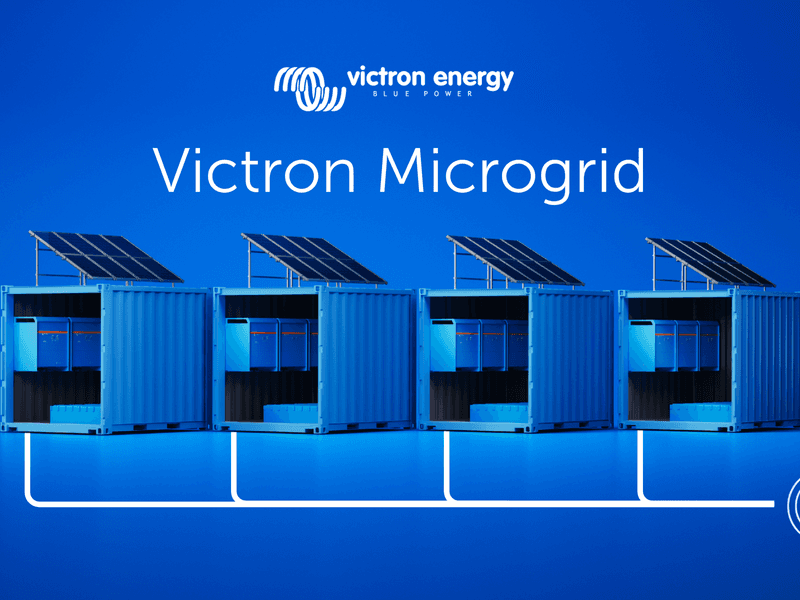
Guy Stewart • 13 April 2026
Introducing Victron Microgrid
What if you could build large off-grid systems with the same simplicity as small ones – just by adding more independent units, increasing reliability, and scaling total capacity as you grow? Large off-grid systems have traditionally been complex to build and difficult to change; Victron Microgrid takes a different approach. Victron Microgrid allows multiple independent Victron inverter/charger systems, named “Power Banks” to operate in parallel on a shared AC bus – even when Power Bank sizes vary – forming high-power off-grid systems that automatically share the load. Each Power Bank is a complete, independent Victron installation with its own inverter/chargers, batteries and monitoring. No central controller, and no data communication wiring between units. If you need more power you can just add another Power Bank, and scale the system – up to 400 kW. Why Victron Microgrid? Scale beyond a single system. Multiple Power Banks on a shared AC bus let you build off-grid systems much larger than a single VE.Bus system, without the complexity and risk of one big centralised inverter installation. Keep running when a unit goes down. Each Power Bank operates on its own. If one is taken offline for service or develops a fault, the rest continue supplying the AC bus uninterrupted. Removing any single point of failure. Add or remove capacity without downtime. Connect more Power Banks to the Microgrid as demand grows. Disconnect them when demand drops or maintenance is needed. No reprogramming required, and the AC bus stays live to loads the whole time. Build with what installers already know. No new hardware. Victron Microgrid uses the same inverter/chargers, batteries, charge controllers and GX devices that installers already work with. Each Power Bank is monitored through its own GX device and VRM. Move equipment between sites. Perfect for rental: containerised Power Banks can go from one project to the next. When a job is done, the same hardware returns to the depot and goes out again ready to join another Microgrid. A standard, efficient container build can be used to satisfy a broad range of applications by simply joining them together via AC wiring on site. Applications Because each Power Bank is self-contained, Victron Microgrid works well on sites where demand changes over time and equipment may need to move between projects. 1. Generator rental fleets Rental operators can treat Power Banks as modular fleet assets. Instead of maintaining many fixed-capacity systems for different jobs, stock standardised Power Banks and combine them to match each contract. A smaller deployment might use two Power Banks; a larger job may need six or more. When a contract ends, the same units return to the depot and go out again in a different combination. Power Banks can be grouped together as a Microgrid in VRM to provide remote monitoring, alarms and visibility across active sites. 2. Construction sites Construction sites often have a stable base-load with temporary spikes in demand. Site offices, lighting and tools may run for months at one level, then a crane, welding gear or other heavy equipment drives consumption up. Extra Power Banks can be brought to site, connected to the AC bus for the peak period, and removed when it’s over. Match capacity to the actual stage of the project and reduce dependence on generator runtime where silent, battery-based power is preferred or required. 3. Events and festivals Demand profiles shift across bump-in, live operation and bump-out. Peak power may only be needed for part of the schedule, but reliable supply is needed throughout. Deploy more Power Banks for peak periods, fewer for quieter ones with no need to redesign the system. If the programme changes, add capacity quickly by connecting another Power Bank to the AC bus. And if one unit has an issue, the rest keep running. 4. Expanding existing off-grid systems Victron Microgrid is also a practical way to upgrade an existing Victron off-grid installation. Instead of pulling a working system apart to make it bigger, install a second Power Bank alongside it and connect both to the same AC bus. The original system stays as it is and just becomes one of the Power Banks in the Microgrid. This is useful for containerised or remote installations where reworking what’s already there would be disruptive. Each Power Bank manages its own charging, so the new unit needs its own charging sources such as additional solar, a DC generator connection, or other DC charging. How Victron Microgrid works A Power Bank is a complete Victron off-grid system: one or more VE.Bus inverter/chargers, a battery bank, DC distribution, DC charging sources, and a GX device for monitoring. In a Victron Microgrid, multiple Power Banks connect to a shared AC bus and work together as one large power system. Load sharing between units happens automatically via AC voltage and frequency, without the need for a central controller, communication between power banks or complex configurations. This decentralised approach keeps the system simple and reliable. Three-phase and split-phase configurations are supported as well. Independent charging – no central controller needed Decentralised DC charging is what makes this controller-less approach work. Each Power Bank manages its own state of charge using its own charging sources. Victron supports a range of charging options: MPPT solar charge controllers for DC-coupled PV AC chargers (such as MultiPlus, Quattro or Multi RS) connected to an AC generator or other AC supply, independent of the Microgrid AC bus. DC generator integration (including start/stop automation) Getting started Victron Microgrid is available via a dedicated VE.Bus firmware for MultiPlus, MultiPlus-II, Quattro and Quattro-II. Walk through the concept, configuration and commissioning with these training videos: Introduction Programming Demonstration The Technical manual covers installation and configuration in detail. See this Slide deck for a more visual overview. Contact a Victron distributor to discuss whether Victron Microgrid fits your application.
Beril Berkem • 31 July 2026
VictronConnect v6.40
This VictronConnect app update is all about convenience and connectivity. For installers, that might mean walking up to any installation with any type of laptop, and being able to connect and adjust product settings right away, without needing extra tools. It might also mean reviewing an older system’s configuration easily, or spotting an issue in a single battery in a battery bank without having to travel to the site. For end-users, it might mean checking in on their system from their phone, in whatever theme they prefer, and getting a more detailed picture of what’s happening, wherever they are. Released today, VictronConnect app v6.40 brings a range of updates designed to make system monitoring and management easier for end-users, as well as professionals. Let’s have a look at what’s new. Bluetooth connectivity now on Windows Many installers rely on a Windows laptop to configure, monitor, and troubleshoot Victron Energy products on site. Until now, this meant a wired connection, such as a VE.Direct USB cable for products like MPPTs and DC-DC chargers, or an MK3-USB cable for VE.Bus products like Multis and Quattros, regardless of whether the product was Smart (has built-in Bluetooth) or not. With this update, the VictronConnect app now also supports Bluetooth connectivity for Windows laptops, so installers can connect to Victron Energy Smart products wirelessly, just like Mac laptops, or iOS and Android phones, already do. One less cable to dig for in the toolbox, and one less thing that can go missing. A wireless connection also gives users the freedom to stand further away from the device while working. Access settings files, without needing the same app version The VictronConnect app has long had a “ Demo feature ” where, along with many things, a saved settings file can be loaded through the Settings file manager , and the app then displays it as though it were connected to the real product, with the full snapshot of settings, readings, and history available for inspection, with only an orange “DEMO PRODUCT” banner as a reminder that no physical device is actually connected. This has allowed installers and end-users to review a system’s configuration, without needing to be on-site or connected to the actual product. More on how this works can be found on the Settings files page of the manual. Until now, that inspection trick came with a catch : it only worked if the settings file had been saved with the exact same VictronConnect version currently installed on the device doing the inspecting. Since the VictronConnect app automatically updates itself , this sometimes made things a bit complicated. A file saved by a customer running whatever version had quietly updated onto their phone last week often simply wouldn’t open for an installer, even on a newer version of the very same app. With the new VictronConnect v6.40, any settings file created with VictronConnect v6.30 or later can now be opened for inspection regardless of which version is currently installed (as long as it’s v6.40 or later), helping speed up inspections. Seeing every battery in the bank, from anywhere Speaking of speedy inspections, wouldn’t it be convenient to see individual battery details in a battery bank remotely, without having to travel to the site? A battery bank is only as strong as its weakest battery, and finding that weak link has traditionally meant being physically present at the installation. With this release, individual battery details from the Lynx Smart BMS , including voltage, temperature, and status per unit, are now visible over remote connections, not just when locally connected. For fleets, remote installations, or any system where a service visit is expensive or slow to arrange, the outlier battery can now be spotted from a desk, with a clear picture of what’s going on before the installer has to pack up their van. SolarSense 750 data, now ready for further analysis We recently introduced the SolarSense 750 , a compact, wireless PV performance monitor designed to help optimise PV energy usage and monitor the health of a PV installation. It measures irradiance, available power, estimated daily min/max solar power (kW), and estimated daily yield (kWh), and logs its own history. Until now, though, that history stayed inside the app. With VictronConnect v6.40, that historical data can now be exported straight to CSV. For installers and integrators doing performance analysis, it is now easier to validate expected solar yield against what a system is actually producing, decide on the optimal position and angle for installing the panels, or put together a report for a client. Your app, your view While most of the features that we’ve mentioned so far will mainly be appreciated by professionals, VictronConnect v6.40 also comes with features for everyone using the app regularly, for example the new dark mode. The app can now follow the phone or laptop’s system theme automatically, or light or dark mode can be set independently, regardless. That same attention to everyday comfort carries over to checking in on a system remotely. VictronConnect’s VRM tab, the one that shows the full system dashboard without leaving the app, has had a round of usability improvements, including proper support for portrait mode for the GX remote console. Note that this particular improvement needs the latest Venus OS on the GX device, which is rolling out in the coming weeks. New product support Alongside all of the above, v6.40 also extends VictronConnect’s reach to new hardware, some available now, and some on the way. Looking ahead, VictronConnect is laying the groundwork for upcoming enhancements to the EV Charging Station (EVCS) . Once a future Venus OS release catches up on the GX side, the app will be able to show vehicle information mid-charge, including battery state of charge and estimated range, and pairing an EVCS to a GX device will become simpler, dropping the need to enter a password at all. Also on the way is support for the new Energy Meter VM-3P5A (more on this new energy meter soon!). Once the meter becomes available, the VictronConnect app will be ready to handle its monitoring and configuration, adding it to the growing list of compatible Victron products. Wrapping up VictronConnect v6.40 brings installers and distributors a faster way to connect on site, easier access to a system’s history and battery health from a distance, and a more flexible way to inspect settings files. For end-users, it means an app that looks the way it’s wanted and feels more at home on a phone, wherever it happens to be checked from. We hope everyone enjoys using these new features. And as always, we really appreciate your feedback as it shapes future improvements, so feel free to share your experience or suggestions in the Victron Community .Besoin d'un conseil? Nos revendeurs hautement qualifiés seront heureux de répondre à toutes vos questions.
Trouver un revendeur près de chez vous
Consultez nos documents de support ou contactez le revendeur original pour une assistance dédiée, une réparation ou une demande de garantie.
Assistance
En savoir plus sur notre garantie standard de 5 ans, leader du secteur, et notre service de réparation mondial.
Garantie

©Victron Energy 2026